
21.5 R 语言
R 是一款面向统计计算与图形可视化的编程语言与自由软件环境,由奥克兰大学统计系的 Ross Ihaka 与 Robert Gentleman 于 1993 年发布,现由 R 核心团队(R Core Team)维护。
其名称既是两位作者名字首字母的组合,也是对贝尔实验室 S 语言(S programming language)的继承:R 语言来自 S 语言,是 S 语言的开源(GPL)衍生,绝大多数为 S 编写的代码不经修改即可在 R 中运行。
R 在统计学、数据科学、生物信息学、计量经济学与社会科学等领域被广泛使用,其生态系统中包含数以万计的扩展包(packages),这些包通过综合 R 存档网络(Comprehensive R Archive Network,CRAN)发布。
FreeBSD 的 Ports 与 pkg 均提供 R 的安装方式。在 Ports 中,R 语言包位于 math/R 分类下。
21.5.1 安装 R 语言
使用 pkg 安装:
# pkg install R或者使用 Ports 安装:
# cd /usr/ports/math/R/
# make install clean安装完成后,可通过以下命令验证版本:
$ R --version
R version 4.6.0 (2026-04-24) -- "Because it was There"
Copyright (C) 2026 The R Foundation for Statistical Computing
Platform: amd64-portbld-freebsd16.0

R is free software and comes with ABSOLUTELY NO WARRANTY.
You are welcome to redistribute it under the terms of the
GNU General Public License versions 2 or 3.
For more information about these matters see
https://www.gnu.org/licenses/.进入交互式会话:
$ R
R version 4.6.0 (2026-04-24) -- "Because it was There"
Copyright (C) 2026 The R Foundation for Statistical Computing
Platform: amd64-portbld-freebsd16.0

R是自由软件,不附带任何担保。
在某些条件下你可以将其自由分发。
用'license()'或'licence()'来看分发的详细条件。

R是个合作计划,有许多人为之做出了贡献.
用'contributors()'来看合著者的详细情况
用'citation()'会告诉你如何在出版物中正确地引用R或R程序包。

用'demo()'来看一些示例程序,用'help()'来阅读在线帮助文件,或
用'help.start()'通过HTML浏览器来看帮助文件。
输入'q()'退出R.

> q()
Save workspace image? [y/n/c]: n # 是否保存工作空间镜像在交互式会话中,使用 q() 退出。
21.5.2 CRAN 镜像与包管理
CRAN 是 R 扩展包的官方发行网络,全球设有数十个镜像站点。首次使用 install.packages() 时,R 会提示用户选择镜像。可通过以下方式在 R 会话中显式指定镜像(以清华大学 TUNA 镜像为例):
options(repos = c(CRAN = "https://mirrors.tuna.tsinghua.edu.cn/CRAN/"))
install.packages("ggplot2")技巧
由于构建 R 包并不轻松(类似于 Python),因此 FreeBSD Port 开发者维护了大量 R 包,并且他们大多命名为
R-cran-*。以ggplot2为例,在 Ports 中为 graphics/R-cran-ggplot2。
也可以在用户主目录下创建 ~/.Rprofile 配置文件,使镜像设置在每次启动 R 时自动生效:
options(repos = c(CRAN = "https://mirrors.tuna.tsinghua.edu.cn/CRAN/"))常用的包管理命令包括:
install.packages("软件包")   # 安装扩展包
update.packages()             # 更新已安装的扩展包
library(软件包)              # 载入扩展包
installed.packages()          # 列出所有已安装的扩展包
remove.packages("软件包") # 移除扩展包21.5.3 基本使用示例
以下示例演示 R 的基本算术运算、向量操作与简单绘图功能。启动 R 并依次执行。请读者先行安装 Port graphics/R-cran-ggplot2。
基本算术运算:
> x <- c(1, 2, 3, 4, 5)
> mean(x)    # 算术平均值
> sd(x)      # 样本标准差
> sum(x)     # 求和
[1] 3
[1] 1.581139
[1] 15向量运算:
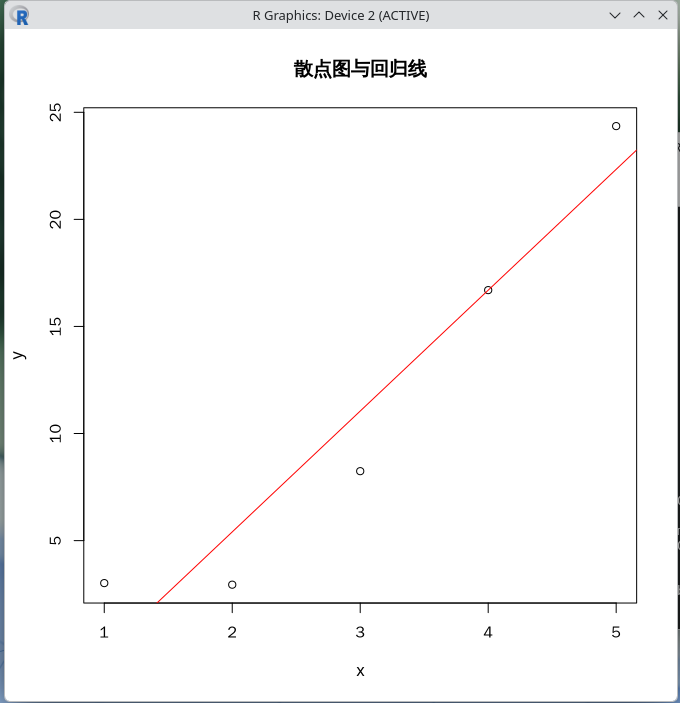
> y <- x^2 + rnorm(5, mean = 0, sd = 1)  # 加入正态分布噪声
> y
[1] 3.015682 2.941824 8.242497 16.696599 24.355322简单的线性回归
> fit <- lm(y ~ x)
> summary(fit)
Call:
lm(formula = y ~ x)

Residuals:
        1         2         3         4         5
 3.252108 -2.465155 -2.807887  0.002809  2.018126

Coefficients:
            Estimate Std. Error t value Pr(>|t|)
(Intercept)  -5.8798     3.2389  -1.815   0.1671
x             5.6434     0.9766   5.779   0.0103 *
---
Signif. codes:  0 ‘***’ 0.001 ‘**’ 0.01 ‘*’ 0.05 ‘.’ 0.1 ‘ ’ 1

Residual standard error: 3.088 on 3 degrees of freedom
Multiple R-squared:  0.9176,    Adjusted R-squared:  0.8901
F-statistic: 33.4 on 1 and 3 DF, p-value: 0.0103绘制散点图与回归线
> plot(x, y, main = "散点图与回归线", xlab = "x", ylab = "y")
> abline(fit, col = "red")将输出下图:
21.5.4 RStudio IDE
RStudio 是最流行的 R 集成开发环境(IDE)之一。它提供语法高亮、代码补全、绘图查看器、数据浏览器以及版本控制等功能。
使用 pkg 安装 RStudio 客户端(服务器为 RStudio-server):
# pkg install RStudio或者使用 Ports 安装:
# cd /usr/ports/devel/RStudio/
# make install clean安装完成后,在桌面环境中通过应用程序菜单启动 RStudio,或在终端中运行:
$ rstudio21.5.5 数据导入与导出
R 支持多种数据格式的读写。常见示例如下:
# 读取 CSV 文件
dat <- read.csv("data.csv")

# 写入 CSV 文件
write.csv(dat, "output.csv", row.names = FALSE)

# 读取 Excel 文件(需安装 readxl 包)
library(readxl)
dat <- read_excel("data.xlsx", sheet = 1)

# 读取 SAS、SPSS、Stata 文件(需安装 haven 包)
library(haven)
dat_sas   <- read_sas("data.sas7bdat")
dat_spss  <- read_sav("data.sav")
dat_stata <- read_dta("data.dta")21.5.6 统计建模与图形可视化
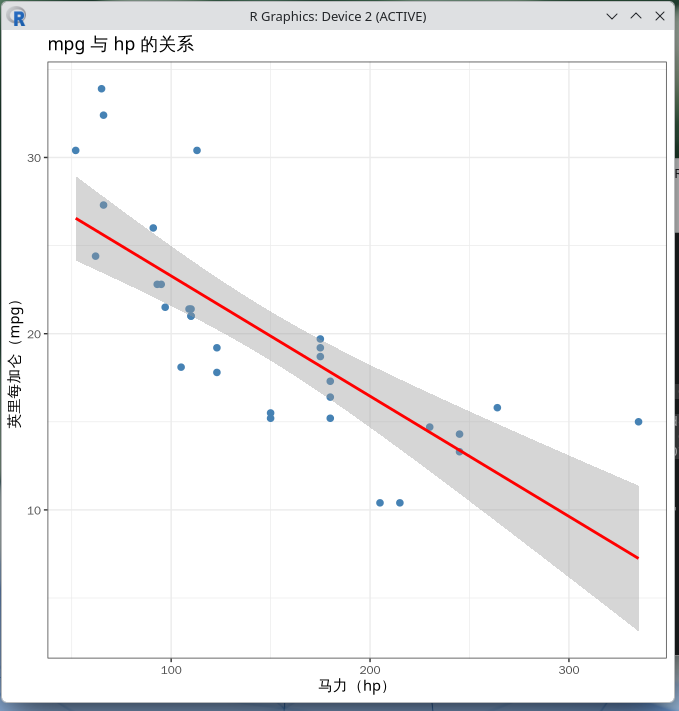
以下示例演示线性模型与 ggplot2 绘图的常见用法:
> library(ggplot2)
# 使用内置数据集 mtcars
> data(mtcars)
> head(mtcars)
                   mpg cyl disp  hp drat    wt  qsec vs am gear carb
Mazda RX4         21.0   6  160 110 3.90 2.620 16.46  0  1    4    4
Mazda RX4 Wag     21.0   6  160 110 3.90 2.875 17.02  0  1    4    4
Datsun 710        22.8   4  108  93 3.85 2.320 18.61  1  1    4    1
Hornet 4 Drive    21.4   6  258 110 3.08 3.215 19.44  1  0    3    1
Hornet Sportabout 18.7   8  360 175 3.15 3.440 17.02  0  0    3    2
Valiant           18.1   6  225 105 2.76 3.460 20.22  1  0    3    1

# 以马力(hp)预测英里每加仑(mpg)
> fit2 <- lm(mpg ~ hp, data = mtcars)
> summary(fit2)
Call:
lm(formula = mpg ~ hp, data = mtcars)

Residuals:
    Min      1Q  Median      3Q     Max
-5.7121 -2.1122 -0.8854  1.5819  8.2360

Coefficients:
            Estimate Std. Error t value Pr(>|t|)
(Intercept) 30.09886    1.63392  18.421  < 2e-16 ***
hp          -0.06823    0.01012  -6.742 1.79e-07 ***
---
Signif. codes:  0 ‘***’ 0.001 ‘**’ 0.01 ‘*’ 0.05 ‘.’ 0.1 ‘ ’ 1

Residual standard error: 3.863 on 30 degrees of freedom
Multiple R-squared:  0.6024,    Adjusted R-squared:  0.5892
F-statistic: 45.46 on 1 and 30 DF,  p-value: 1.788e-07


# 绘制散点图与拟合曲线
> ggplot(mtcars, aes(x = hp, y = mpg)) +
>   geom_point(color = "steelblue", size = 2) +
>   geom_smooth(method = "lm", se = TRUE, color = "red") +
>   labs(
>     title = "mpg 与 hp 的关系",
>     x     = "马力(hp)",
>     y     = "英里每加仑(mpg)"
>   ) +
> theme_bw()将输出下图:
21.5.7 常用包推荐
| 分类 | 包名/Port | 用途 |
|---|---|---|
| 数据处理 | dplyr(databases/R-cran-dtplyr)、tidyr(devel/R-cran-tidyr)、data.table(devel/R-cran-data.table) | 数据清洗、筛选、变形与汇总 |
| 图形可视化 | ggplot2(graphics/R-cran-ggplot2) | 静态与交互式绘图 |
| 时间序列 | tseries(finance/R-cran-tseries) | 时间序列建模与预测 |
| 机器学习 | caret(devel/R-cran-caret) | 分类与回归模型训练 |
| 并行计算 | future(devel/R-cran-future)、doParallel(devel/R-cran-doParallel) | 多核与分布式计算 |
21.5.8 与其他语言的互操作
R 可以与多种编程语言互操作。以下是常见场景:
21.5.8.1 调用 C/C++ 代码
通过 Rcpp 包(Port devel/R-cran-Rcpp)可在 R 中直接嵌入 C++ 代码:
> library(Rcpp)
> cppFunction('
>   double my_mean(NumericVector x) {
>     int n = x.size();
>     double total = 0;
>     for (int i = 0; i < n; i++) {
>       total += x[i];
>     }
>     return total / n;
>   }
> ')
> my_mean(c(1, 2, 3, 4, 5))
[1] 321.5.8.2 在 R 中调用 Python 代码
通过 reticulate 包可在 R 会话中调用 Python:
> install.packages("reticulate") # 安装 R 包
> library(reticulate)
> use_python("/usr/local/bin/python3")  # 替换为实际路径
> py_run_string("
> import numpy as np
> a = np.array([1, 2, 3, 4, 5])
> print('Python 中计算的均值:', a.mean())
> ")
Python 中计算的均值: 3.021.5.8.3 在 Python 中调用 R
通过 Python 的 rpy2(math/py-rpy2)包可在 Python 中调用 R:
$ python3
Python 3.11.15 (main, May 12 2026, 01:16:18) [Clang 21.1.8 (https://github.com/llvm/llvm-project.git llvmorg-21.1.8-0-g2078da on freebsd16
Type "help", "copyright", "credits" or "license" for more information.
>>> import rpy2.robjects as robjects
>>> from rpy2.robjects.packages import importr
>>>
>>> stats = importr("stats")
>>> r_mean = robjects.r("mean")
>>> result = r_mean(robjects.FloatVector([1, 2, 3, 4, 5]))
>>> print("R 中计算的均值:", result[0])
R 中计算的均值: 3.0按 Ctrl + D 可以退出上述界面。
21.5.9 命令行批处理模式
R 支持批处理运行脚本。新建脚本 analysis.R,写入以下内容:
x <- rnorm(100, mean = 0, sd = 1)
cat("样本均值:", mean(x), "\n")
cat("样本标准差:", sd(x), "\n")在终端中执行:
$ Rscript analysis.R
样本均值: 0.1388172
样本标准差: 1.032565该模式适用于将 R 整合进 Shell 脚本、定时任务或批处理工作流。
21.5.10 故障排除
21.5.10.1 扩展包编译失败
部分扩展包需要调用 C/C++/Fortran 编译器。请确保系统已安装 devel/gmake、lang/gcc(含 gfortran)以及相关依赖。可使用以下命令一次性安装常用编译工具链:
# pkg install gmake gcc pkgconf21.5.10.2 中文显示乱码
请先按照其他章节正确设置 LANG、LC_ALL 等本地化环境变量。在 R 中可额外设置:
options(encoding = "UTF-8")
Sys.setlocale("LC_CTYPE", "zh_CN.UTF-8")21.5.10.3 图形设备无法启动
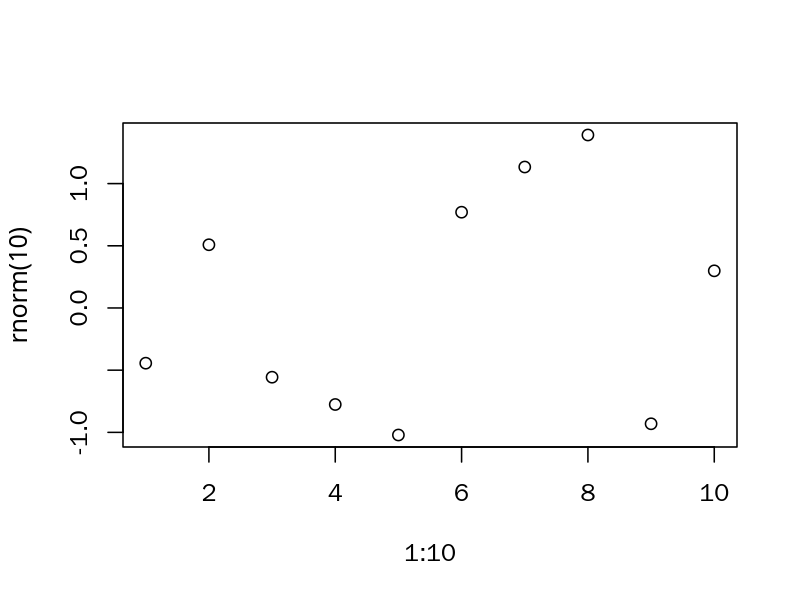
在无图形界面的服务器环境中,需要将绘图输出到文件设备(png、pdf、svg 等):
> png("plot.png", width = 800, height = 600, res = 150)
> plot(1:10, rnorm(10))
> dev.off()
> null device
> getwd() # 获取输出的图片路径
[1] "/home/ykla"查看该图:
21.5.11 参考资料
- R CORE TEAM. R: The R Project for Statistical Computing[EB/OL]. [2026-06-09]. https://www.r-project.org/. R 官方网站
- COMPREHENSIVE R ARCHIVE NETWORK. CRAN mirrors[EB/OL]. [2026-06-09]. https://cran.r-project.org/mirrors.html. CRAN 镜像列表
- R CORE TEAM. An Introduction to R[EB/OL]. [2026-06-09]. https://cran.r-project.org/manuals.html. R 导论。
- Wickham H, Çetinkaya-Rundel M, Grolemund G. R数据科学(第2版):R for Data Science: Import, Tidy, Transform, Visualize, and Model Data[M]. 张敬信, 王小宁, 黄俊文, 译. 北京: 人民邮电出版社, 2025. ISBN: 978-7-115-68264-2.