
20.6 Gentoo Linux 兼容层
Gentoo 兼容层通过 stage3 tarball 构建基本系统,构建前需启用 Linux 内核模块。本节给出从守护进程配置到基本系统完成的完整脚本。
20.6.1 构建基本系统
构建 Gentoo Linux 兼容层前需启用核心守护进程。
20.6.1.1 守护进程
sh
# service linux enable       # 设置 Linux 内核模块开机自启
# service linux start        # 启动 Linux 内核模块
# service dbus enable        # 设置 dbus 服务开机自启(一般桌面环境已配置)
# service dbus start # 启动 dbus 服务(一般桌面环境已配置)20.6.1.2 获取基本系统镜像
下载 Gentoo Stage3 镜像:
sh
# fetch https://mirrors.ustc.edu.cn/gentoo/releases/amd64/autobuilds/20230101T164658Z/stage3-amd64-llvm-openrc-20230101T164658Z.tar.xz上述链接会随版本更新,请自行获取最新链接。
创建 Gentoo 兼容层目录:
sh
# mkdir -p /compat/gentoo将 Gentoo 镜像解压到兼容层目录:
sh
# tar xpvf stage3-amd64-llvm-openrc-20230101T164658Z.tar.xz -C /compat/gentoo --numeric-owner20.6.1.3 挂载文件系统
构建完成后,须挂载必要的文件系统。将 Linux 兼容层默认路径指向 /compat/gentoo 以实现相关文件系统的自动挂载。
立即生效:
sh
# sysctl compat.linux.emul_path=/compat/gentoo永久设置:
sh
# echo "compat.linux.emul_path=/compat/gentoo" >> /etc/sysctl.conf重启 Linux 兼容层服务:
sh
service linux restart项目结构:
sh
/compat/gentoo/
├── dev/                  # 设备文件系统
│   ├── fd/               # 文件描述符文件系统
│   └── shm/              # 内存文件系统
├── etc/
│   ├── portage/
│   │   ├── make.conf     # Portage 配置文件
│   │   └── repos.conf/
│   │       └── gentoo.conf # Gentoo 仓库配置
│   └── resolv.conf       # DNS 配置
├── home/                 # 用户主目录(可选)
├── proc/                 # Linux 进程文件系统
├── sys/                  # Linux 内核对象文件系统
├── tmp/                  # 临时目录
└── usr/
    └── share/
        └── portage/
            └── config/
└── repos.conf # 默认仓库配置20.6.1.4 编辑 Gentoo 配置文件
编辑 /compat/gentoo/etc/portage/make.conf 文件,加入:
sh
MAKEOPTS="-j2"                                                                 # 设置编译时并行作业数为 2
GENTOO_MIRRORS="https://mirrors.ustc.edu.cn/gentoo"                            # 指定 Gentoo 镜像源
FEATURES="-ipc-sandbox -mount-sandbox -network-sandbox -pid-sandbox -xattr -sandbox -usersandbox" # 禁用各种沙箱功能和扩展属性保留基本配置:
sh
# mkdir -p /compat/gentoo/etc/portage/repos.conf/                                        # 创建 Portage 仓库配置目录
# cp /compat/gentoo/usr/share/portage/config/repos.conf /compat/gentoo/etc/portage/repos.conf/gentoo.conf  # 复制默认仓库配置
# cp /etc/resolv.conf /compat/gentoo/etc/ # 复制 DNS 配置到兼容层20.6.1.5 修改 Gentoo 的软件源
在 FreeBSD 下,编辑 /compat/gentoo/etc/portage/repos.conf/gentoo.conf 文件,修改 Gentoo 仓库配置文件:将 sync-uri = rsync://rsync.gentoo.org/gentoo-portage 修改为 sync-uri = rsync://mirrors.tuna.tsinghua.edu.cn/gentoo-portage。
进入 Gentoo 兼容层环境,使用 Bash 作为 shell:
sh
# chroot /compat/gentoo /bin/bash # 此时位于 Gentoo 兼容层使用 Gentoo 的 webrsync 工具同步 Portage 树:
sh
# emerge-webrsync # 获取 Gentoo ebuild 数据库快照。20.6.2 测试使用
使用 Gentoo Portage 安装 fastfetch 工具,并显示详细输出:
sh
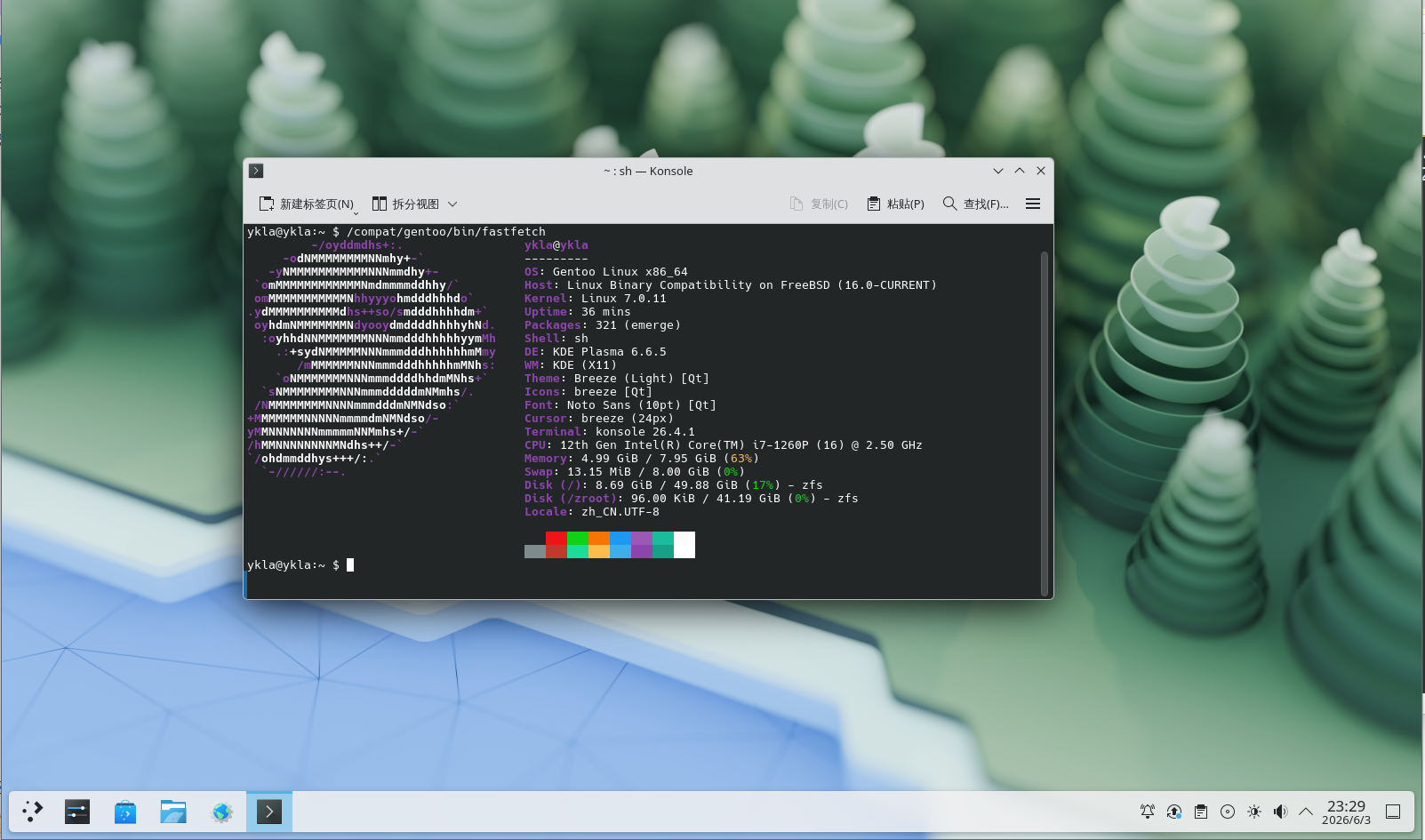
# emerge -ask fastfetch可以直接在 FreeBSD 命令行运行 fastfetch:
sh
$ /compat/gentoo/bin/fastfetch输出如下:
20.6.3 shell 脚本
脚本内容:
sh
#!/bin/sh

LinuxKernel=7.0.11
rootdir=/compat/gentoo   # Gentoo 根目录路径
fetch https://mirror.nju.edu.cn/gentoo/releases/amd64/autobuilds/latest-stage3-amd64-llvm-openrc.txt  # 下载最新 Stage3 构建列表
gentoodownload=$(grep 'stage3-amd64-llvm-openrc' latest-stage3-amd64-llvm-openrc.txt  | awk '{print $1}')   # 提取最新 Stage3 文件名
rm latest-stage3-amd64-llvm-openrc.txt  # 删除临时文件

url="https://mirror.nju.edu.cn/gentoo/releases/amd64/autobuilds/"

echo "Starting Gentoo Linux installation..."   # 提示安装开始
echo "Checking required modules..."   # 提示模块检查

# 检查 Linux 模块是否启用
if [ "$(sysrc -n linux_enable)" != "YES" ]; then
        echo "The Linux module is not enabled. Enable it now? (Y|n)"   # 提示用户是否继续
        read answer   # 读取用户输入
        case $answer in
                [Nn][Oo]|[Nn])
                        echo "Linux module not enabled"
                        exit 1
                        ;;
                [Yy][Ee][Ss]|[Yy]|"")
                        service linux enable
                        ;;
        esac
fi
echo "Starting Linux service"   # 提示正在启动 Linux 服务
service linux start   # 启动 Linux 模块

# 检查 dbus 是否安装
if ! /usr/bin/which -s dbus-daemon;then
        echo "dbus-daemon not found. Install D-Bus? [Y|n]"   # 提示安装 dbus
        read  answer   # 读取用户输入
        case $answer in
            [Nn][Oo]|[Nn])
                echo "D-Bus not installed"   # 提示未安装
                exit 2   # 退出脚本
                ;;
            [Yy][Ee][Ss]|[Yy]|"")
                pkg install -y dbus   # 安装 dbus
                ;;
        esac
    fi

# 检查 dbus 是否启用
if [ "$(sysrc -n dbus_enable)" != "YES" ]; then
        echo "D-Bus is not enabled. Enable it now? (Y|n)"   # 提示是否启用
        read answer
        case $answer in
            [Nn][Oo]|[Nn])
                        echo "D-Bus not enabled"   # 提示未运行
                        exit 2
                        ;;
            [Yy][Ee][Ss]|[Yy]|"")
                        service dbus enable   # 启用 dbus 服务
                        ;;
        esac
fi
echo "Starting D-Bus service"   # 提示正在启动 D-Bus 服务
service dbus start   # 启动 dbus 服务

echo "Now bootstrapping Gentoo"   # 提示正在初始化 Gentoo

fetch "${url}/$gentoodownload"   # 下载最新 Stage3 文件
mkdir -p "${rootdir}"   # 创建 Gentoo 根目录
tar xpvf stage3-amd64-llvm-openrc*.tar.xz -C "${rootdir}" --numeric-owner  2>&1 | grep -v "Error exit delayed from previous errors" # 解压 Stage3
rm stage3-amd64-llvm-openrc*.tar.xz   # 删除压缩包

# 设置兼容层路径
sysctl compat.linux.emul_path="${rootdir}"

if ! grep -q '^compat.linux.emul_path=' /etc/sysctl.conf 2>/dev/null; then
    echo "compat.linux.emul_path=${rootdir}" >> /etc/sysctl.conf
else
    sed -i '' "s|^compat.linux.emul_path=.*|compat.linux.emul_path=${rootdir}|" /etc/sysctl.conf
fi

echo "compat.linux.emul_path=$(sysctl -n compat.linux.emul_path)"

echo "compat.linux.osrelease=${LinuxKernel}"
sysctl compat.linux.osrelease=${LinuxKernel}

if ! grep -q '^compat.linux.osrelease=' /etc/sysctl.conf 2>/dev/null; then
    echo "compat.linux.osrelease=${LinuxKernel}" >> /etc/sysctl.conf
else
    sed -i '' "s|^compat.linux.osrelease=.*|compat.linux.osrelease=${LinuxKernel}|" /etc/sysctl.conf
fi

service linux restart

echo "Setting resolv.conf to Alibaba DNS"   # 提示即将设置 DNS
echo "Continue? [Y|n]"
read answer
case $answer in
	[Nn][Oo]|[Nn])
		echo "Please configure Gentoo manually. Exiting."   # 用户选择不自动配置
		exit 0
		;;
	[Yy][Ee][Ss]|[Yy]|"")
		grep -q "nameserver 223.5.5.5" "${rootdir}/etc/resolv.conf" 2>/dev/null || \
		    echo "nameserver 223.5.5.5" >> "${rootdir}/etc/resolv.conf"
		grep -q "nameserver 223.6.6.6" "${rootdir}/etc/resolv.conf" 2>/dev/null || \
		    echo "nameserver 223.6.6.6" >> "${rootdir}/etc/resolv.conf"
esac
echo "Writing MAKEOPTS and FEATURES to /compat/gentoo/etc/portage/make.conf -- using NJU mirrors for GENTOO_MIRRORS"
echo "MAKEOPTS='-j2'" >> "${rootdir}/etc/portage/make.conf"
echo "GENTOO_MIRRORS='https://mirror.nju.edu.cn/gentoo'" >> "${rootdir}/etc/portage/make.conf"
echo "FEATURES='-ipc-sandbox -mount-sandbox -network-sandbox -pid-sandbox -xattr -sandbox -usersandbox'" >> "${rootdir}/etc/portage/make.conf"

echo "Now configuring software sources -- Using TUNA mirror for emerge-webrsync"
mkdir -p "${rootdir}/etc/portage/repos.conf/"
cp "${rootdir}/usr/share/portage/config/repos.conf" "${rootdir}/etc/portage/repos.conf/gentoo.conf"
sed -i "" 's/rsync.gentoo.org/mirrors.tuna.tsinghua.edu.cn/' "${rootdir}/etc/portage/repos.conf/gentoo.conf"
echo "Running emerge-webrsync"
chroot "${rootdir}" /bin/bash -c "emerge-webrsync"

echo "Base system ready."
echo "To enter: chroot ${rootdir} /bin/bash"