
23.2 Samba 文件共享
23.2.1 Samba 概述
Samba 是服务器消息块(Server Message Block,SMB)/通用 Internet 文件系统(Common Internet File System,CIFS)协议的自由软件实现,核心目标是实现 UNIX 系统与 Windows 网络环境的互操作性。
在技术架构上,smbd(文件与打印服务守护进程)与 nmbd(NetBIOS 名称服务守护进程)协同工作:smbd 处理文件共享与打印服务请求,nmbd 提供 NetBIOS 名称解析与网络浏览功能。
Samba 需要在防火墙中放行以下端口:TCP 139(NetBIOS 会话服务)与 445(SMB over TCP),以及 UDP 137(NetBIOS 名称服务)与 138(NetBIOS 数据报服务)。
“Samba”一词源自 Andrew Tridgell 使用 Unix 的 grep 命令从系统词典中搜索并选取包含 S、M、B 三个字母(Server Message Block 的首字母)的单词。该词在葡萄牙语和英语中也指“桑巴舞”。
23.2.2 软件安装
Samba 有两种主要安装方式:
- 使用 pkg 安装:
# pkg install samba420- 或使用 Ports 安装:
# cd /usr/ports/net/samba420/
# make install clean- 查看安装信息
# pkg info -D samba42023.2.3 相关项目结构
/
├── usr
│   └── local
│       ├── etc
│       │   └── smb4.conf                # Samba 主配置文件
│       └── bin
│           ├── samba-tool               # Samba 综合管理工具
│           └── samba-nsupdate           # Samba DNS 更新工具
├── var
│   ├── db
│   │   └── samba4                       # Samba 相关数据库目录
│   └── log
│       └── samba4                       # Samba 日志目录
├── etc
│   ├── rc.conf                           # 系统启动配置文件
│   ├── resolv.conf                       # DNS 解析配置文件
│   ├── sysctl.conf                        # 系统参数配置文件
│   └── nsswitch.conf                      # 名称服务切换配置文件
└── samba
└── testshare # Samba 共享目录23.2.4 基础配置
- 将 Samba 服务设置为开机启动:
# service samba_server enable- 创建 /usr/local/etc/smb4.conf 文件,写入以下内容并保存:
[global]
    min protocol = SMB2

[root]
    comment = root's stuff
    path = /root
    public = no
    browseable = yes
    writable = yes
    printable = no
create mask = 0755注释说明:
[global]:全局配置段,适用于所有共享项。min protocol = SMB2:将最小支持协议限制为 SMB2,以便高版本 Windows 访问。[root]:定义共享root。comment = root's stuff:该共享的描述信息,在 Windows 浏览器中可见。path = /root:共享的实际路径是 /root,不推荐 在实际环境中共享该目录。public = no:不允许匿名访问(等同于guest ok = no)。browseable = yes:可在网络邻居中浏览共享。writable = yes:允许客户端写入该目录。printable = no:非打印机共享。create mask = 0755:新建文件默认权限为 755,属主读写,组和其他用户只读。创建 Samba root 用户,并设置密码:
# smbpasswd -a root # 为 Samba 用户 root 设置密码技巧
必须将 FreeBSD 用户账户映射到 Samba 账号数据库,Windows 客户端才能访问共享。使用 pdbedit(8) 将已有的 FreeBSD 用户账户
ykla映射到 Samba:sh# pdbedit -a -u yklapdbedit(8) 支持基于 smbpasswd、ldap、nis+ 和 tdb 的数据库。
- 启动 Samba 服务
# service samba_server start- 查看 Samba 服务的运行状态:
# service samba_server status
nmbd is running as pid 1520.
smbd is running as pid 1525.Samba 由 nmbd、smbd 和 winbindd 三个守护进程组成。其中 nmbd 和 smbd 由 samba_server_enable 统一管理,winbindd 需通过 winbindd_enable 单独启用。
- 在 Windows 系统中访问共享文件夹:按下 Windows 键 + R(不区分大小写)打开“运行”对话框,输入以下路径(请将示例 IP 地址替换为实际值):
\\192.168.179.150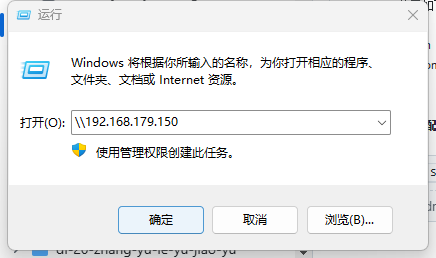
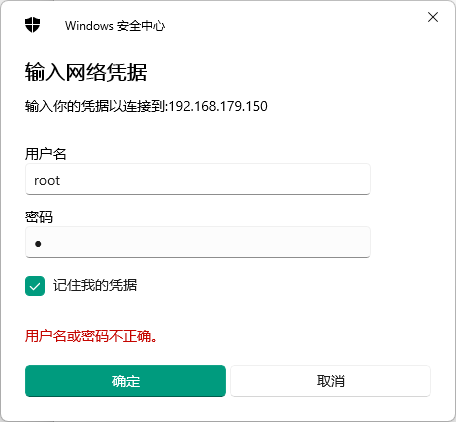
输入此前创建的用户名 root,以及密码:
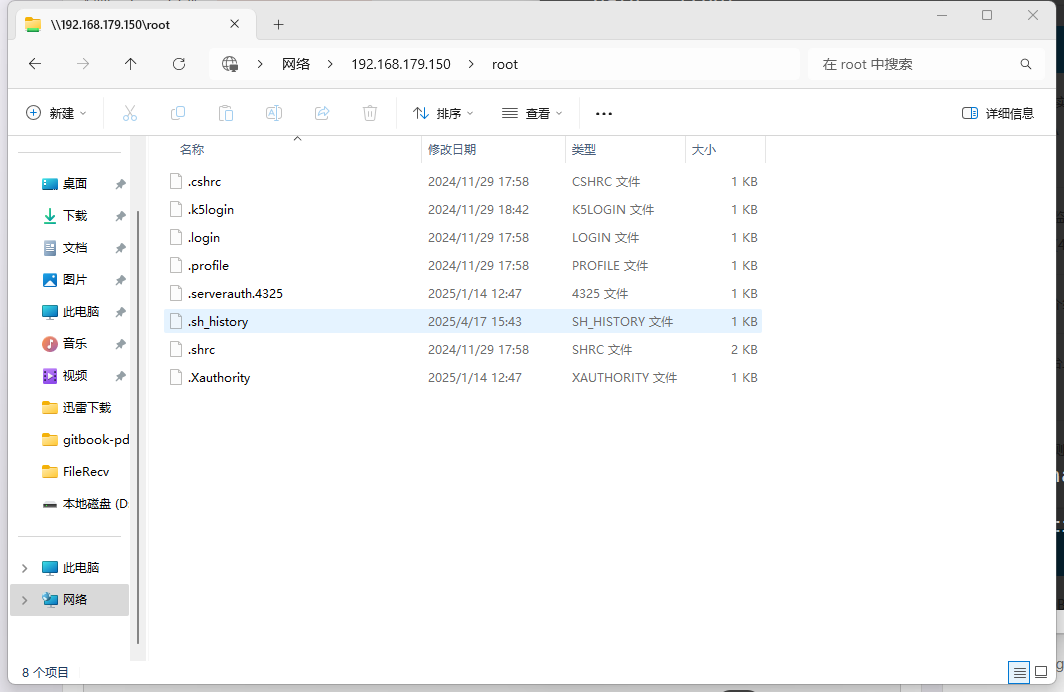
连接成功:
23.2.5 域成员配置
23.2.5.1 系统参数优化
# echo "kern.maxfiles=25600" >> /etc/sysctl.conf        # 设置系统最大打开文件数
# echo "kern.maxfilesperproc=16384" >> /etc/sysctl.conf # 设置每个进程最大打开文件数
# echo "net.inet.tcp.sendspace=65536" >> /etc/sysctl.conf  # 设置 TCP 发送缓冲区大小
# echo "net.inet.tcp.recvspace=65536" >> /etc/sysctl.conf # 设置 TCP 接收缓冲区大小23.2.5.2 Kerberos 认证
[libdefaults]
    default_realm = SVROS.COM        # 设置 Kerberos 默认领域
    dns_lookup_realm = true          # 启用通过 DNS 查找域
    dns_lookup_kdc = true            # 启用通过 DNS 查找 KDC
    ticket_lifetime = 24h            # 设置票据有效期为 24 小时
    renew_lifetime = 7d              # 设置票据可续期时间为 7 天
forwardable = yes # 允许票据可转发23.2.5.3 配置名称服务
配置 NSS,使用本地文件和 Winbind 查询用户信息:
# sed -i '' -e "s/^passwd:.*/passwd: files winbind/" /etc/nsswitch.conf配置 NSS,使用本地文件和 Winbind 查询组信息:
# sed -i '' -e "s/^group:.*/group: files winbind/" /etc/nsswitch.conf23.2.5.4 Samba 主配置文件
[global]
	workgroup = SVROS
	server string = Samba Server Version %v
	security = ads
	realm = SVROS.COM
	domain master = no
	local master = no
	preferred master = no
	use sendfile = true

	idmap config * : backend = tdb
	idmap config * : range = 100000-299999
	idmap config SVROS : backend = rid
	idmap config SVROS : range = 10000-99999
	winbind separator = +
	winbind enum users = yes
	winbind enum groups = yes
	winbind use default domain = yes
	winbind nested groups = yes
	winbind refresh tickets = yes
	template homedir = /home/%D/%U
	template shell = /bin/false

	client use spnego = yes
	restrict anonymous = 2
	log file = /var/log/samba4/log.%m
	max log size = 50

#============================ 自定义共享信息 ==============================

[testshare]
	comment = Test share
	path = /samba/testshare
	read only = no
	force group = "Domain Users"
	directory mode = 0770
	force directory mode = 0770
	create mode = 0660
force create mode = 0660上述 testshare 共享配置中最后两行用于调整实际使用权限(可选)。
create mode = 0750
force create mode = 075023.2.5.5 加入域
net ads join --no-dns-updates -U administrator   # 将主机加入 Active Directory 域,不更新 DNS
net ads testjoin                                 # 测试主机是否成功加入域
# 应输出 "Join is OK"
# 在域控制器上,打开 DNS 管理控制台(MMC),为 BSD 服务器添加一条 A 记录,以便客户端定位该服务器23.2.5.6 服务自启动配置
# echo "samba_server_enable=YES" >> /etc/rc.conf   # 设置 Samba 服务开机自动启动
# echo "winbindd_enable=YES" >> /etc/rc.conf # 设置 Winbind 服务开机自动启动23.2.5.7 Kerberos 认证验证
kinit administrator   # 使用管理员账户获取 Kerberos 票据,输入密码后应正常返回提示符
klist                  # 查看当前 Kerberos 票据缓存
# 输出示例:
Credentials cache: FILE:/tmp/krb5cc_0
    Principal: administrator@SVROS.COM

Issued                Expires               Principal
Dec 6 10:15:39 2021 Dec 7 10:15:39 2021 krbtgt23.2.5.8 Winbind 服务验证
wbinfo -u
# 应返回域用户列表

wbinfo -g
# 应返回域用户组列表

getent passwd
# 用户列表末尾应包含 UID 大于 10000 的域用户

getent group
# 用户组列表末尾应包含 GID 大于 10000 的域用户组如果 wbinfo 命令返回错误,重启 Samba 服务:
# service samba_server restart23.2.5.9 共享目录配置
# mkdir -p /samba/testshare                                # 创建共享目录
# chown "administrator:domain users" /samba/testshare   # 设置目录所有者为 administrator,组为 domain users
# chmod 0770 /samba/testshare # 设置目录权限为所有者和组可读写执行,其他用户无权限如果仅允许属主可读写,属组只读,可使用以下命令设置:
# chmod 0750 /samba/testshare # 设置目录权限为所有者可读写执行,组可读执行,其他用户无权限如果仅允许属主可读写,属组和其他用户不可访问,可使用以下命令设置:
# chmod -R 0700 /samba/testshare # 递归设置目录及其内容权限为仅所有者可读写执行23.2.6 故障排除与未竟事宜
Samba 日志文件位于 /var/log/samba4 目录。
23.2.7 参考文献
- HERTEL C. Samba: An Introduction[EB/OL]. (2001)[2026-04-18]. https://www.samba.org/samba/docs/SambaIntro.html. Samba 官方文档,说明 SMB/CIFS 协议实现及名称来源。
- Microsoft Corporation. [MS-CIFS]: Common Internet File System (CIFS) Protocol[EB/OL]. (2025-06-11)[2026-04-18]. https://learn.microsoft.com/en-us/openspecs/windows_protocols/ms-cifs/934c2faa-54af-4526-ac74-6a24d126724e. Microsoft 开放规范,CIFS 是 SMB 协议的一个方言(dialect)。