
14.6 权限提升工具(sudo、doas 等)
sudo 和 doas 通过配置文件定义权限规则,使特定用户无需 root 密码即可执行特权操作,并提供操作日志。
思考题
即使是管理员,在无需特权操作时也应当限制自己的权限。
你认为这种权限限制设计的缺点是什么?
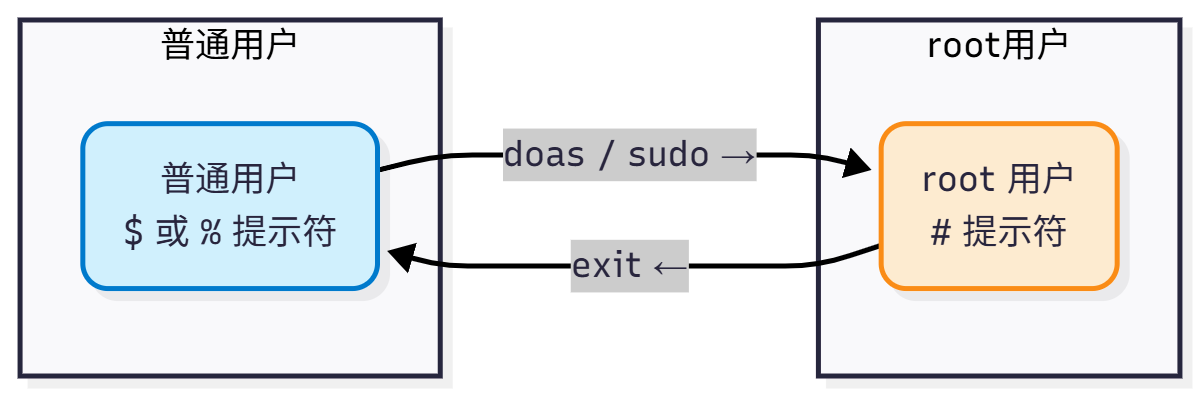
14.6.1 doas
doas 是从 OpenBSD 移植的命令行工具,可作为类 Unix 系统中 sudo 的替代方案。
doas 的作者是 Ted Unangst,首次随 OpenBSD 5.8 引入。用户可通过 doas 以提升的权限执行命令(通常以 root 身份)。与 sudo 不同,doas 强调配置简洁与安全性,专注于精简的权限委派,避免庞杂的配置选项。
使用时可将 sudo 直接替换为 doas,二者在基本使用场景下功能等价。但 doas 除 NOPASSWD 外,不支持 sudo 的其他细粒度权限控制(如时间戳超时、命令参数限制、插件架构等)。
14.6.1.1 安装 doas
- 使用 pkg 安装:
# pkg install doas- 或者使用 Ports 安装:
# cd /usr/ports/security/doas/
# make install clean14.6.1.2 使用 doas 进行共享管理
用户 user2 只需创建文件 /usr/local/etc/doas.conf 并写入:
permit nopass user2 as root即可允许用户 user2 在执行 doas 时无需输入密码即可获取 root 权限。如果不需要 doas 免密码,移除 nopass 即可。
对于 wheel 组用户,则写入以下行即可:
permit nopass :wheel安装并配置好 doas 之后,即可执行特权命令:
$ doas ee /etc/rc.conf14.6.1.3 doas 示例配置文件
示例配置文件位于 /usr/local/etc/doas.conf.sample。
简要注释如下:
# Sample file for doas
# Please see doas.conf manual page for information on setting
# up a doas.conf file.

# Permit members of the wheel group to perform actions as root.
permit :wheel # 允许 wheel 组成员 doas

# Same without having to enter the password
permit nopass :wheel # 允许 wheel 组成员 doas,但免密码

# Permit user alice to run commands as a root user.
permit alice as root # 允许用户 alice doas

# Permit user bob to run programs as root, maintaining
# environment variables. Useful for GUI applications.
permit keepenv bob as root  # 允许用户 bob doas,并继承用户 bob 的环境变量,图形用户界面程序需要,但会降低安全性(参见查看安装后信息)

# Permit user cindy to run only the pkg package manager as root
# to perform package updates and upgrades.
permit cindy as root cmd pkg args update  # 仅允许用户 cindy 执行 pkg update
permit cindy as root cmd pkg args upgrade # 仅允许用户 cindy 执行 pkg upgrade

# Allow david to run id command as root without logging it
permit nolog david as root cmd id # 允许 david 以 root 身份运行 id 命令且不记录日志14.6.2 sudo
sudo 的初始作者是 Bob Coggeshall 和 Cliff Spencer(原始版本,1986 年),主要重写和维护者是 Todd C. Miller。
sudo 的 sudoers 配置语法复杂度较高,手册页逾 1000 行,容易配置错误导致安全漏洞;时间戳文件位于 /var/run/sudo/ts/,若文件系统已满可能无法正常工作;sudo -i 在某些 shell 环境下可能不会完整加载环境变量。
sudo 允许管理员配置更严格的系统命令访问,并提供日志记录功能。
14.6.2.1 安装 sudo
- 使用 pkg 安装:
# pkg install sudo- 或者使用 Ports 安装:
# cd /usr/ports/security/sudo/
# make install clean14.6.2.2 使用 sudo 进行共享管理
sudo 配置文件由若干小节组成,支持深度自定义。
14.6.2.2.1 配置普通用户使用 sudo
未配置的普通用户执行 sudo 将提示错误 xxx Is Not in the Sudoers File. This Incident Will Be Reported。
需要在 sudoers 配置文件中加入一行以解决该问题。编辑 /usr/local/etc/sudoers 文件,找到 root ALL=(ALL:ALL) ALL 这一行,通常位于第 94 行。在其下方添加一行:
实际普通用户 ALL=(ALL:ALL) ALL然后保存并退出。用户“实际普通用户”将能够使用 sudo,提示输入密码时输入该用户密码即可,无需 root 用户密码。
14.6.2.2.2 授予特定用户执行特定命令的权限
在下面的示例中,Web 应用运维人员 user1 需要启动、停止和重启 Web 应用程序 webservice。要授予该用户相关权限,请在 /usr/local/etc/sudoers 文件末尾新增一行:
user1 ALL=(ALL) /usr/sbin/service webservice *随后用户 user1 即可通过以下命令启动 webservice:
$ sudo /usr/sbin/service webservice start上述配置仅对单个用户(user1)授权了 webservice 服务,但大多数组织会有 Web 团队负责相关管理。仅需一行配置,即可将权限赋予整个组。以下步骤将先创建 web 组,再向其中添加用户,最终使组内所有成员都具备管理该服务的能力:
# pw groupadd -g 6001 -n webteam再使用 pw 命令将所需用户 user1 添加至 webteam 组:
# pw groupmod -m user1 -n webteam最后,在 /usr/local/etc/sudoers 文件中写入以下行,即可让 webteam 组的所有成员都有权限管理 webservice:
%webteam ALL=(ALL) /usr/sbin/service webservice *14.6.2.2.3 sudo 普通用户和组免密码
授权使用 sudo 的用户只需输入自身密码即可完成认证。相比 su,sudo 的优点在于:su 需要输入 root 密码并授予完整的 root 权限,而 sudo 可按用户或组进行细粒度权限控制。要允许 webteam 组成员免密码管理该服务,可改为:
%webteam ALL=(ALL) NOPASSWD: /usr/sbin/service webservice *类似地,如果希望用户 user1 免密码,则改为:
user1 ALL=(ALL) NOPASSWD:ALL如果希望 wheel 组中的用户也免密码,则如下:
%wheel ALL=(ALL) NOPASSWD:ALL百分号 % 表示组,不加 % 表示普通用户。
14.6.3 sudo-rs
sudo-rs 是 Rust 编写的 sudo 与 su 实现,以安全为导向,具备内存安全性。
14.6.3.1 与 sudo 不共存的安装方案
安装 sudo-rs 前必须先卸载 sudo,该方式下两者不能共存。
- 使用 pkg 安装:
# pkg install sudo-rs- 或者使用 Ports 安装:
# cd /usr/ports/security/sudo-rs/
# make install clean提供了 sudo、visudo 和 sudoedit 命令。
visudo 以安全方式编辑 sudoers 文件,类似于 vipw(8)。它锁定 sudoers 文件防止同时编辑,执行基本有效性检查,并在安装前检查语法错误。若发现语法错误,会显示行号并提示“What now?”,用户可选择 e(重新编辑)、x(退出不保存)或 Q(强制保存,有风险)。编辑器选择由 SUDO_EDITOR、VISUAL、EDITOR 环境变量决定,默认为 /usr/bin/vi。
FreeBSD 的 visudo 来自 sudo 软件包(非基本系统),与 Linux 版本来自同一上游源代码,基本兼容。
14.6.3.2 与 sudo 共存的安装方案
系统中同时存在 sudo 与 sudo-rs。
- 使用 pkg 安装:
# pkg install sudo-rs-coexist- 还可以通过 Ports 来安装:
# cd /usr/ports/security/sudo-rs/
# make -V FLAVORS # 查看有哪些 FLAVORS
default coexist
# make FLAVOR=coexist install clean # 指定安装共存版本的 sudo-rs提供了 sudo-rs、visudo-rs 和 sudoedit-rs 命令。
14.6.3.3 sudo-rs 示例配置文件
配置文件位于:/usr/local/etc/sudoers。
## sudoers file.
## sudoers 文件。

##
## This file MUST be edited with the 'visudo' command as root.
## 此文件必须通过 root 身份使用 visudo 命令编辑。

## Failure to use 'visudo' may result in syntax or file permission errors
## that prevent sudo from running.
## 不使用 visudo 可能导致语法或权限错误,从而使 sudo 无法运行。

##
## See the sudoers man page for the details on how to write a sudoers file.
## 如何编写 sudoers 文件的详细说明请参阅 sudoers 的手册页(man sudoers)。

## Defaults specification
## 默认设置规范

##
## Preserve editor environment variables for visudo.
## 为 visudo 保留编辑器相关的环境变量。

## To preserve these for all commands, remove the "!visudo" qualifier.
## 若希望对所有命令都保留这些变量,请移除“!visudo”限定。

Defaults!/usr/local/sbin/visudo env_keep += "SUDO_EDITOR EDITOR VISUAL"
## 仅对 /usr/local/sbin/visudo 命令保留环境变量 SUDO_EDITOR、EDITOR、VISUAL。

##
## Use a hard-coded PATH instead of the user's to find commands.
## 使用硬编码的 PATH 查找命令,而不是使用用户的 PATH。

## This also helps prevent poorly written scripts from running
## arbitrary commands under sudo.
## 这也有助于防止编写不当的脚本在 sudo 下执行任意命令。

Defaults secure_path="/usr/local/sbin:/usr/local/bin:/usr/sbin:/usr/bin:/sbin:/bin"
## 为 sudo 指定固定的安全 PATH 路径。

##
## Uncomment if needed to preserve environmental variables related to the
## FreeBSD pkg utility and fetch.
## 如果需要保留与 FreeBSD pkg 工具和 fetch 相关的环境变量,请取消注释。

# Defaults     env_keep += "PKG_CACHEDIR PKG_DBDIR FTP_PASSIVE_MODE"
## 示例:保留 pkg 缓存/数据库路径与 FTP 被动模式变量。

##
## Additionally uncomment if needed to preserve environmental variables
## related to portupgrade
## 另外,如需保留与 portupgrade 相关的环境变量,请取消注释。

# Defaults     env_keep += "PORTSDIR PORTS_INDEX PORTS_DBDIR PACKAGES PKGTOOLS_CONF"
## 示例:保留 ports 树、索引、数据库、二进制包与工具配置等变量。

##
## You may wish to keep some of the following environment variables
## when running commands via sudo.
## 通过 sudo 运行命令时,可能需要保留以下某些环境变量。

##
## Locale settings
## 本地化设置(语言/地区)

# Defaults env_keep += "LANG LANGUAGE LINGUAS LC_* _XKB_CHARSET"
## 示例:保留语言与 LC_* 等本地化相关变量。

##
## X11 resource path settings
## X11 资源路径设置

# Defaults env_keep += "XAPPLRESDIR XFILESEARCHPATH XUSERFILESEARCHPATH"
## 示例:保留与 X 应用资源搜索路径相关变量。

##
## Desktop path settings
## 桌面相关路径设置

# Defaults env_keep += "QTDIR KDEDIR"
## 示例:保留 Qt/KDE 的安装路径变量。

##
## Allow sudo-run commands to inherit the callers' ConsoleKit session
## 允许 sudo 运行的命令继承调用者的 ConsoleKit 会话。

# Defaults env_keep += "XDG_SESSION_COOKIE"
## 示例:保留 XDG 会话 cookie(ConsoleKit 时代的变量)。

##
## Uncomment to enable special input methods.  Care should be taken as
## this may allow users to subvert the command being run via sudo.
## 取消注释可启用特殊输入法。但需谨慎,这可能允许用户绕过 sudo 所运行的命令。

# Defaults env_keep += "XMODIFIERS GTK_IM_MODULE QT_IM_MODULE QT_IM_SWITCHER"
## 示例:保留输入法相关环境变量。

##
## Uncomment to disable "use_pty" when running commands as root.
## 取消注释可在以 root 运行命令时禁用“use_pty”。

## Commands run as non-root users will run in a pseudo-terminal,
## not the user's own terminal, to prevent command injection.
## 以非 root 用户运行的命令将使用伪终端,而非用户的原始终端,以防止命令注入。

# Defaults>root !use_pty
## 对 root 目标用户禁用 use_pty(示例,默认注释)。

##

##
## User privilege specification
## 用户权限规范

##
root ALL=(ALL:ALL) ALL
## root 可在所有主机上,以任意(用户:组)身份运行任意命令(需要认证)。

## Uncomment to allow members of group wheel to execute any command
## 取消注释以允许 wheel 组成员执行任意命令。

# %wheel ALL=(ALL:ALL) ALL
## 示例:授予 wheel 组与 root 类似的 sudo 权限(需密码)。

## Same thing without a password
## 同上,但无需输入密码。

# %wheel ALL=(ALL:ALL) NOPASSWD: ALL
## 示例:wheel 组成员可无密码执行任意命令。

## Uncomment to allow members of group sudo to execute any command
## 取消注释以允许 sudo 组成员执行任意命令。

# %sudo	ALL=(ALL:ALL) ALL
## 示例:授予 sudo 组以任意(用户:组)身份执行任意命令的权限(需密码)。

## Uncomment to allow any user to run sudo if they know the password
## of the user they are running the command as (root by default).
## 取消注释可允许任意用户在知道目标用户(默认为 root)密码的情况下运行 sudo。

# Defaults targetpw  # Ask for the password of the target user
## 使用目标用户密码进行认证(而非调用者的密码)。

# ALL ALL=(ALL:ALL) ALL  # WARNING: only use this together with 'Defaults targetpw'
## 所有用户均可以任意身份运行任意命令(危险!仅与 Defaults targetpw 搭配使用)。

## Read drop-in files from /usr/local/etc/sudoers.d
## 从 /usr/local/etc/sudoers.d 读取附加配置片段(drop-in)。

@includedir sudoers.d
## 包含相对目录 sudoers.d(相对于 /usr/local/etc),读取其中的配置文件。14.6.3.4 测试
$ sudo su
[sudo: authenticate] Password: # 此处同样不会显示任何输入内容,无 *** 等掩码提示
#14.6.4 附录:通过 mac_do 权限提升
参考文献:
- K Rin. FreeBSD MAC 簡單介紹[EB/OL]. [2026-03-26]. https://sandb0x.tw/a/FreeBSD_MAC_簡單介紹. 以中文简要介绍 FreeBSD 强制访问控制框架的基本概念与配置方式。
- FreeBSD Project. mac_do(4)[EB/OL]. [2026-03-26]. https://man.freebsd.org/cgi/man.cgi?query=mac_do&sektion=4. MAC 策略 do 模块手册页。
- OpenBSD. doas -- execute commands as another user[EB/OL]. [2026-04-17]. https://man.openbsd.org/doas.1. doas 权限提升工具手册页。
14.6.5 权限提升工具配置文件结构
以下是本节介绍的权限提升工具配置文件路径总结:
/usr/local/etc/
├── doas.conf  # doas 配置文件
├── doas.conf.sample  # doas 示例配置文件
├── sudoers  # sudo/sudo-rs 主配置文件
└── sudoers.d/  # sudo 附加配置目录
    ├── username  # 用户名配置文件
└── wheel # wheel 组配置文件14.6.6 课后习题
- 查阅 FreeBSD 中
mac_do模块的源代码,分析其通过 Mandatory Access Control 实现权限提升的机制,梳理其与sudo/doas在权限模型上的本质差异。 - 查阅 FreeBSD Ports 中
doas工具的源代码实现,分析其配置解析、规则匹配和环境变量处理的设计,评估其在简单性与安全性之间的权衡策略。 - 修改
doas配置中的keepenv选项,记录其对环境变量继承行为的影响,分析不同环境变量(如PATH、HOME)在权限提升场景下的安全风险。