
11.4 Arch Linux 兼容层
Arch Linux 兼容层基于 Arch bootstrap 镜像构建。Bash/Zsh 在 chroot 后无终端输出(termios2 ioctls 未实现,FreeBSD 15-STABLE 已修复)。
注意
完成兼容层构建并 chroot 进入环境后,终端界面可能表现为无响应;Bash 进程虽未产生输出,但仍可正常接收输入并执行命令。即使将默认 shell 切换至 Zsh,该现象仍然存在,且 TTY 终端会报告错误:
linux: jid 0 pid 1154 (bash): linux_ioctl_fallback fd=0, cmd=0x802c542a ('T',42) is not implemented。根据 FreeBSD 源代码仓库中的提交记录 linux: support termios2 ioctls,该问题已在 FreeBSD 15.0-STABLE 中修复。
视频教程:07-FreeBSD-Arch Linux 兼容层脚本使用说明
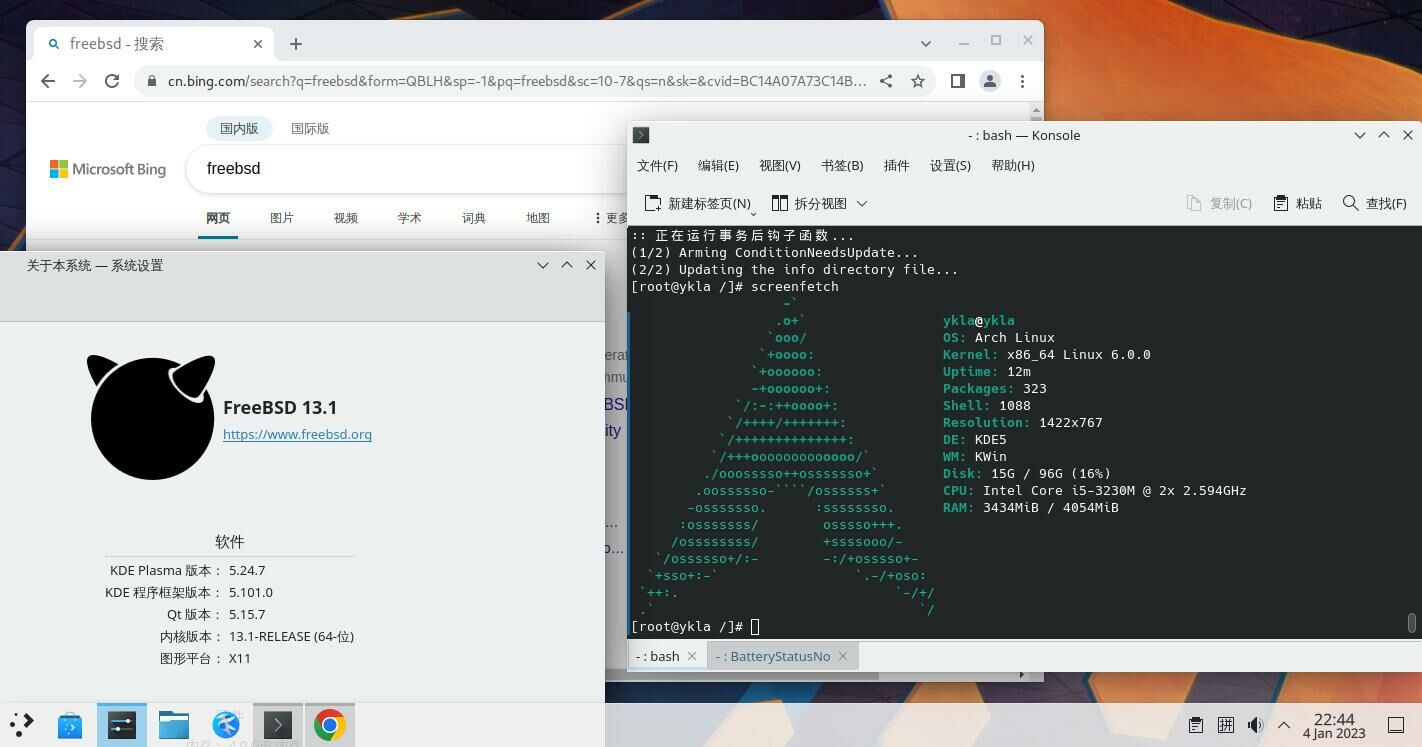
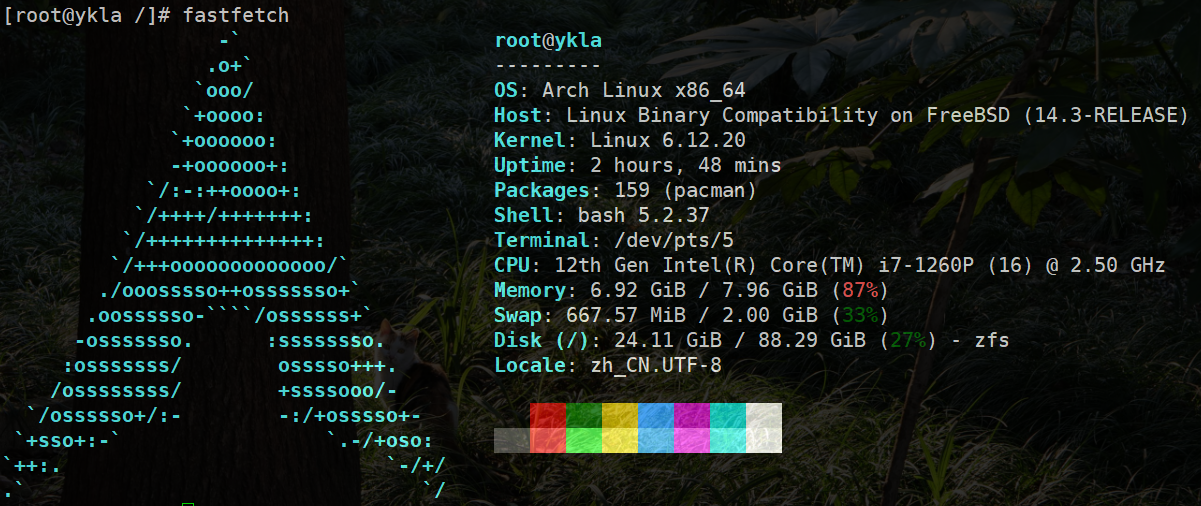
由于 Google Chrome 浏览器在后台运行,Arch Linux 兼容层占用的系统资源略高于 Ubuntu 兼容层。
11.4.1 构建基本系统
构建 Arch Linux 兼容层需要先处理必要的服务项和设置。
11.4.1.1 处理所需服务项
11.4.1.1.1 Linux 服务项
# service linux enable   # 设置 Linux 兼容层服务开机自启
# service linux start # 启动 Linux 兼容层服务11.4.1.1.1.1 D-Bus
桌面环境通常已配置 D-Bus 服务。若未安装,请先安装 D-Bus。
设置 D-Bus 服务开机自启:
# service dbus enable启动 D-Bus 服务:
# service dbus start11.4.1.2 调整 Linux 兼容层默认内核版本
对于滚动发行版,Linux 兼容层的默认内核版本通常较低。若直接构建,Arch Linux 兼容层在 chroot 时会报错 FATAL: kernel too old。因此,需要将 Linux 兼容层的内核版本调整为 6.12.63(或其他较高版本)。
- 查看当前 Linux 兼容层的内核版本:
# sysctl compat.linux.osrelease
compat.linux.osrelease: 5.15.0注意
必须先启动
linux服务才能查看当前的 Linux 内核版本。
- 调整到较新的版本号(参见:Kernel.org. The Linux Kernel Archives[EB/OL]. [2026-03-26]. https://www.kernel.org/. 可获得所需版本号):
# echo "compat.linux.osrelease=6.12.63" >> /etc/sysctl.conf   # 将 Linux 兼容内核版本写入 sysctl 配置文件,实现持久化
# sysctl compat.linux.osrelease=6.12.63 # 立即生效设置,无需重启11.4.1.3 安装自举系统
# mkdir -p /compat/arch   # 创建挂载 Linux 系统的目录
# fetch https://ftp.sjtu.edu.cn/archlinux/iso/latest/archlinux-bootstrap-x86_64.tar.zst   # 下载 Arch Linux bootstrap 压缩包
# tar --use-compress-program=unzstd -xpvf archlinux-bootstrap-x86_64.tar.zst --strip-components=1 -C /compat/arch --numeric-owner # 解压压缩包到 /compat/arch:同时保持原有 GID 和 UID。若出现 tar 报错通常可忽略--strip-components=1 即在解压 archlinux-bootstrap-x86_64.tar.zst 文件时去掉外层路径 root.x86_64,直接解压到指定路径。
11.4.2 挂载文件系统
将 nullfs_load="YES" 写入 /boot/loader.conf 文件(如需立刻生效,可使用 kldload nullfs)。
将以下内容添加到 /etc/fstab 文件中:
devfs           /compat/arch/dev      devfs           rw,late                      0       0
tmpfs           /compat/arch/dev/shm  tmpfs           rw,late,size=1g,mode=1777    0       0
fdescfs         /compat/arch/dev/fd   fdescfs         rw,late,linrdlnk             0       0
linprocfs       /compat/arch/proc     linprocfs       rw,late                      0       0
linsysfs        /compat/arch/sys      linsysfs        rw,late                      0       0
/tmp /compat/arch/tmp nullfs rw,late 0 0加入后的 /etc/fstab 文件示例(请勿复制粘贴下方代码):
# Device                Mountpoint      FStype  Options         Dump    Pass#
/dev/gpt/efiboot0               /boot/efi       msdosfs rw              2       2
/dev/nda0p2             none    swap    sw              0       0
devfs           /compat/arch/dev      devfs           rw,late                      0       0
tmpfs           /compat/arch/dev/shm  tmpfs           rw,late,size=1g,mode=1777    0       0
fdescfs         /compat/arch/dev/fd   fdescfs         rw,late,linrdlnk             0       0
linprocfs       /compat/arch/proc     linprocfs       rw,late                      0       0
linsysfs        /compat/arch/sys      linsysfs        rw,late                      0       0
/tmp /compat/arch/tmp nullfs rw,late 0 0警告
请严格遵照上面的操作,否则需进入急救模式!
检查挂载过程中是否有报错:
# mount -al挂载 /etc/fstab 文件中所有未挂载的文件系统。
11.4.3 基本配置
11.4.3.1 初始化 pacman 密钥环
# cp /etc/resolv.conf /compat/arch/etc/   # 在 FreeBSD 中将 DNS 配置复制到 Arch 兼容层
# chroot /compat/arch /bin/bash           # 切换到 Arch 兼容层环境
# pacman-key --init                        # 初始化 pacman 密钥环
# pacman-key --populate archlinux # 导入 Arch Linux 官方密钥11.4.3.2 切换软件源
新安装的 Arch 未安装文本编辑器,需要在 FreeBSD 中编辑相关文件,设置 Arch Linux 的 pacman 使用清华大学镜像源:
# ee /compat/arch/etc/pacman.d/mirrorlist # 此时位于 FreeBSD!将下行添加至文件顶部。

Server = https://mirrors.tuna.tsinghua.edu.cn/archlinux/$repo/os/$arch11.4.3.3 启用 DisableSandbox
FreeBSD 未实现 landlock 沙盒机制,需为 pacman 启用 DisableSandbox,否则触发错误 error: restricting filesystem access failed because landlock is not supported by the kernel!。
在 pacman.conf 文件中取消 DisableSandbox 选项的注释:
# sed -E -i '' 's/^[[:space:]]*#[[:space:]]*DisableSandbox/DisableSandbox/' /compat/arch/etc/pacman.conf检查是否启用成功,在 pacman.conf 中查找 DisableSandbox 所在行及行号:
# grep -n 'DisableSandbox' /compat/arch/etc/pacman.conf使用 pacman 安装基本系统、开发工具、文本编辑器 nano、AUR 助手 yay 以及文泉驿字体 wqy-zenhei:
# pacman -S base base-devel nano yay wqy-zenhei11.4.3.3.1 参考文献
- Arch Linux Project. pacman.conf(5)[EB/OL]. [2026-03-25]. https://man.archlinux.org/man/pacman.conf.5.en. 说明了 DisableSandbox 配置项的用途和适用场景。
11.4.3.3.2 archlinuxcn 源配置
配置 Arch Linux CN 仓库使用清华大学镜像:
# nano /etc/pacman.conf # 将下两行添加至文件底部。

[archlinuxcn]
Server = https://mirrors.tuna.tsinghua.edu.cn/archlinuxcn/$arch安装 Arch Linux CN 仓库密钥环:
# pacman -S archlinuxcn-keyring技巧
在
==> Locally signing trusted keys in keyring...这一步可能需要十分钟或更长时间。请耐心等待。
yay 及其他 AUR 助手禁止以 root 身份直接运行,需要在 chroot 中创建一个具备普通权限的新用户(经测试,FreeBSD 中现有普通用户不适用于此场景)。
创建用户 test,并加入 wheel 组,同时创建用户主目录:
# useradd -G wheel -m test使用文本编辑器编辑 sudoers 文件 /etc/sudoers,配置用户权限(若有红色警告请忽略):
删除 # %wheel ALL=(ALL) ALL 前的注释符号 #。
删除 # %sudo ALL=(ALL:ALL) ALL 前的注释符号 #。
卸载 fakeroot 并安装 fakeroot-tcp,否则无法使用 AUR。
该 bug 见 Problem with fakeroot and qemu。
使用 pacman 安装 fakeroot-tcp 工具:
# pacman -S fakeroot-tcp # 会询问是否卸载 fakeroot,请确认并卸载。技巧
若为用户
test设置了密码后仍提示密码错误,需打开新终端,执行reboot命令重启 FreeBSD,然后继续操作。
11.4.3.4 区域设置
提示
如不设置此项,Arch Linux 的图形化程序将无法使用中文输入法。
编辑 /etc/locale.gen 文件,将 zh_CN.UTF-8 UTF-8 前面的注释 # 删除。
生成系统本地化语言环境:
# locale-gen11.4.4 shell 脚本
脚本内容如下:
#!/bin/sh                                                 # 指定脚本使用的 shell

rootdir=/compat/arch                                     # 定义 Arch 兼容层根目录
url="https://ftp.sjtu.edu.cn/archlinux/iso/latest/archlinux-bootstrap-x86_64.tar.zst"  # Arch Linux bootstrap 下载地址

echo "Starting Arch Linux installation..."                   # 输出安装开始信息
echo "check modules ..."                                 # 输出模块检查信息

# 检查 linux 模块
if [ "$(sysrc -n linux_enable)" = "NO" ]; then          # 检查 Linux 内核模块是否启用
        echo "linux module should be loaded. Continue? (Y|n)"  # 提示是否继续
        read answer                                     # 读取用户输入
        case $answer in                                 # 处理用户选择
                [Nn][Oo]|[Nn])
                        echo "linux module not loaded" # 提示模块未加载
                        exit 1                         # 退出脚本
                        ;;
                [Yy][Ee][Ss]|[Yy]|"")
                        sysrc linux_enable=YES         # 启用 Linux 内核模块
                        ;;
        esac
fi
echo "start linux"                                       # 输出启动 Linux 信息
service linux start                                      # 启动 Linux 内核模块

# 检查 dbus
if ! /usr/bin/which -s dbus-daemon;then                 # 检查 dbus-daemon 是否存在
        echo "dbus-daemon not found. Install it [Y|n]"  # 提示安装 dbus
        read  answer                                    # 读取用户输入
        case $answer in
            [Nn][Oo]|[Nn])
                echo "dbus not installed"               # 提示未安装 dbus
                exit 2                                  # 退出脚本
                ;;
            [Yy][Ee][Ss]|[Yy]|"")
                pkg install -y dbus                     # 安装 dbus
                ;;
        esac
    fi

if [ "$(sysrc -n dbus_enable)" != "YES" ]; then         # 检查 dbus 服务是否启用
        echo "dbus should be enabled. Continue? (Y|n)"  # 提示是否启用
        read answer                                     # 读取用户输入
        case $answer in
            [Nn][Oo]|[Nn])
                        echo "dbus not running"        # 提示 dbus 未运行
                        exit 2                          # 退出脚本
                        ;;
            [Yy][Ee][Ss]|[Yy]|"")
                        service dbus enable             # 启用 dbus 服务开机自启
                        ;;
        esac
fi
echo "start dbus"                                        # 输出启动 dbus 信息
service dbus start                                       # 启动 dbus 服务

echo "now we will bootstrap Arch Linux"                  # 输出 bootstrap 开始信息

fetch ${url}                                             # 下载 Arch Linux bootstrap 压缩包
mkdir -p ${rootdir}                                           # 创建挂载目录
tar --use-compress-program=unzstd -xpvf archlinux-bootstrap-x86_64.tar.zst --strip-components=1 -C ${rootdir} --numeric-owner  # 解压压缩包
rm archlinux-bootstrap-x86_64.tar.zst                  # 删除压缩包

if [ ! "$(sysrc -f /boot/loader.conf -qn nullfs_load)" = "YES" ]; then  # 检查 nullfs 是否加载
        echo "nullfs_load should load. Continue? (Y|n)"  # 提示是否继续
        read answer                                     # 读取用户输入
        case $answer in
            [Nn][Oo]|[Nn])
                echo "nullfs is not loaded"                  # 提示未加载
		exit 3                                      # 退出脚本
                ;;
            [Yy][Ee][Ss]|[Yy]|"")
                sysrc -f /boot/loader.conf nullfs_load=yes  # 设置 nullfs 开机自启
                ;;
        esac
fi

if ! kldstat -n nullfs >/dev/null 2>&1;then            # 检查 nullfs 模块是否已加载
        echo "load nullfs module"                      # 输出加载信息
        kldload -v nullfs                               # 加载 nullfs 模块
fi

echo "mount some fs for linux"                         # 输出挂载文件系统信息
echo "devfs ${rootdir}/dev devfs rw,late 0 0" >> /etc/fstab        # devfs 挂载
echo "tmpfs ${rootdir}/dev/shm tmpfs rw,late,size=1g,mode=1777 0 0" >> /etc/fstab  # tmpfs 挂载
echo "fdescfs ${rootdir}/dev/fd fdescfs rw,late,linrdlnk 0 0" >> /etc/fstab        # fdescfs 挂载
echo "linprocfs ${rootdir}/proc linprocfs rw,late 0 0" >> /etc/fstab               # linprocfs 挂载
echo "linsysfs ${rootdir}/sys linsysfs rw,late 0 0" >> /etc/fstab                  # linsysfs 挂载
echo "/tmp ${rootdir}/tmp nullfs rw,late 0 0" >> /etc/fstab                         # /tmp 挂载
#echo "/home ${rootdir}/home nullfs rw,late 0 0" >> /etc/fstab                     # /home 挂载,可选
mount -al                                               # 挂载 fstab 中所有文件系统

echo "For Arch Linux, we should change 'compat.linux.osrelease'. Continue? (Y|n)"  # 提示修改 Linux 内核版本
read answer                                             # 读取用户输入
case $answer in
	[Nn][Oo]|[Nn])
		echo "close to success"                        # 提示跳过修改
		exit 4
		;;
	[Yy][Ee][Ss]|[Yy]|"")
		echo "compat.linux.osrelease=6.12.63" >> /etc/sysctl.conf  # 持久化设置 Linux 内核版本
		sysctl compat.linux.osrelease=6.12.63                     # 立即生效
                ;;
esac
echo "complete!"                                        # 提示完成
echo "to use: chroot ${rootdir} /bin/bash"             # 提示使用 chroot 进入 Arch 兼容层
echo ""
echo "but for ease of use, I can do some initial config"     # 提示可进行初始化配置
echo "if agree:"                                        # 提示用户选择
echo "   I set resolv.conf to Ali DNS"                  # 将 DNS 设置为阿里云公共 DNS
echo "   init pacman keyring"                            # 初始化 pacman 密钥环
echo "   use Tsinghua mirror"                            # 使用清华镜像
echo "Continue? [Y|n]"                                   # 提示是否继续
read answer                                             # 读取用户输入
case $answer in
	[Nn][Oo]|[Nn])
		echo "set up your Arch Linux by yourself. Bye!"   # 提示用户自行配置
		exit 0
		;;
	[Yy][Ee][Ss]|[Yy]|"")
		echo "nameserver 223.5.5.5" >> ${rootdir}/etc/resolv.conf    # 设置 DNS
		chroot ${rootdir} /bin/bash -c "pacman-key --init"           # 初始化 pacman 密钥
		chroot ${rootdir} /bin/bash -c "pacman-key --populate archlinux"  # 导入官方密钥
		cat ${rootdir}/etc/pacman.d/mirrorlist > mlst.tmp             # 备份镜像列表
		echo 'Server = https://mirrors.tuna.tsinghua.edu.cn/archlinux/$repo/os/$arch' > ${rootdir}/etc/pacman.d/mirrorlist  # 设置清华镜像
		cat mlst.tmp >> ${rootdir}/etc/pacman.d/mirrorlist            # 恢复原有镜像列表内容
		rm mlst.tmp                                                    # 删除临时文件
		echo '[archlinuxcn]' >> ${rootdir}/etc/pacman.conf             # 添加 archlinuxcn 仓库
		echo 'Server = https://mirrors.tuna.tsinghua.edu.cn/archlinuxcn/$arch' >> ${rootdir}/etc/pacman.conf  # 设置 archlinuxcn 镜像
		echo "Refresh sources and system"                              # 输出刷新信息
		echo "Now we will enable DisableSandbox for pacman or you will get the error: restricting filesystem access failed because landlock is not supported by the kernel!"  # 提示禁用 Sandbox
		sed -E -i '' 's/^[[:space:]]*#[[:space:]]*DisableSandbox/DisableSandbox/' ${rootdir}/etc/pacman.conf  # 取消注释 DisableSandbox
		grep -n 'DisableSandbox' ${rootdir}/etc/pacman.conf           # 验证 DisableSandbox
		chroot ${rootdir} /bin/bash -c "pacman -Syyu --noconfirm"     # 更新系统
		echo "Refresh keys"                                             # 输出刷新密钥信息
    		chroot ${rootdir} /bin/bash -c "pacman -S --noconfirm archlinuxcn-keyring"  # 安装 archlinuxcn-keyring
		echo "Install yay"                                             # 输出安装 yay 信息
		chroot ${rootdir} /bin/bash -c "pacman -S --noconfirm yay base base-devel nano wqy-zenhei"  # 安装软件
		echo "Create user"                                             # 输出创建用户信息
		chroot ${rootdir} /bin/bash -c "useradd -G wheel -m test"      # 创建用户 test 并加入 wheel 组
		echo "Now modify the sudo configuration"                       # 输出修改 sudoers 信息
		echo '%wheel ALL=(ALL) ALL' >> ${rootdir}/etc/sudoers          # 允许 wheel 组 sudo 权限
		echo '%sudo ALL=(ALL:ALL) ALL' >> ${rootdir}/etc/sudoers       # 允许 sudo 组 sudo 权限
		echo "change fakeroot"                                         # 输出安装 fakeroot-tcp 信息
		chroot ${rootdir} /bin/bash -c "pacman -S --noconfirm fakeroot-tcp"  # 安装 fakeroot-tcp
		echo "Make localised settings"                                  # 输出本地化设置信息
		echo 'zh_CN.UTF-8 UTF-8' >> ${rootdir}/etc/locale.gen           # 添加中文 UTF-8
		chroot ${rootdir} /bin/bash -c "locale-gen"                     # 生成语言环境
		echo "all done."                                                # 输出完成信息
                ;;
esac
echo "Now you can run '#chroot /compat/arch/ /bin/bash' to enter Arch Linux" # 提示用户进入 Arch Linux11.4.5 参考文献
- FreeBSD Project. linux(4)[EB/OL]. [2026-03-25]. https://man.freebsd.org/cgi/man.cgi?query=linux&sektion=4. 该文档详细介绍 FreeBSD Linux 兼容层的技术原理与配置方法。
- Arch Linux 中文维基. 从现有 Linux 发行版安装 Arch Linux[EB/OL]. [2026-03-25]. https://wiki.archlinuxcn.org/wiki/从现有_Linux_发行版安装_Arch_Linux. 该文档提供从现有系统安装 Arch Linux 的标准流程指引。